Lint: [Invoegen] + [Externe documenten] + [Document] Sneltoets: geen Icoon: |


In Ibis voor Infra is het mogelijk om elk willekeurig bestand aan een project toe te voegen. Hiertoe is in de projectstructuur het item ’Documenten’ opgenomen. Het item 'Documenten' is in de structuur bewust buiten de modules gehouden; dit om aan te geven dat het geen onderdeel is van het bestek of de calculatie. Het kan daarom niet vanuit Ibis voor Infra worden afgedrukt en vormt geen onderdeel van een (RAW-)uitwisselingsbestand.
Als op deze keuze wordt geklikt wordt er een venster geopend om een document te selecteren:
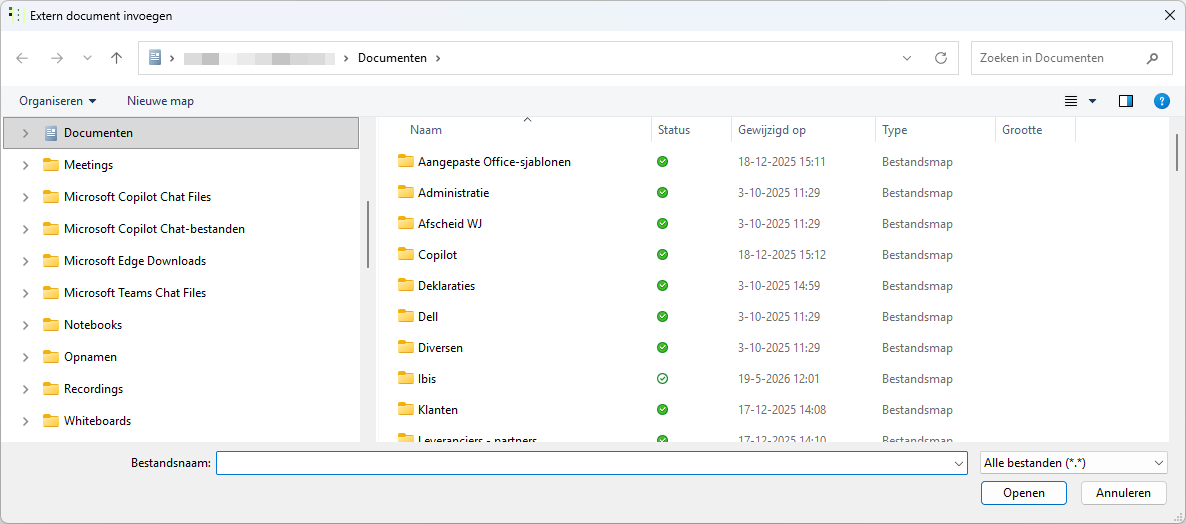
De in Windows ingestelde folder 'Mijn documenten' wordt geopend.
Op deze manier kunnen meerdere mappen en/of submappen met documenten worden aangemaakt. Op deze wijze kan een eigen mappenstructuur met documenten worden aangemaakt. Dit zou er als volgt uit kunnen zien:
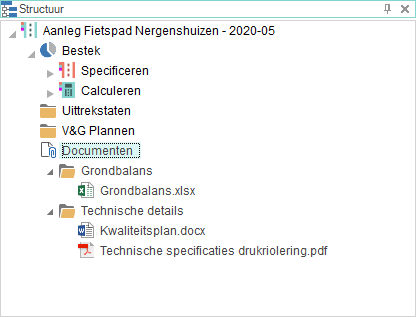
Als het ingevoegde document een eigen bestandsassociatie heeft, dan wordt het bijbehorende programma opgestart met dubbelklikken op het betreffende document.
N.B. |
Het toevoegen van documenten aan de structuur is géén koppeling met de documenten, maar een opname in de database van Ibis voor Infra. Een document dat geopend wordt vanuit de structuur (dubbelklikken of rechtermuisknop), zal als een ’alleen lezen’ bestand worden geopend. Opslaan van het geopende bestand zal een ’Opslaan als’ actie uitvoeren. Hierna zal dit nieuwe bestand (in de plaats van het oude bestand) moeten worden toegevoegd aan de structuur. |
Beperkingen van bestandstypen die kunnen worden toegevoegd
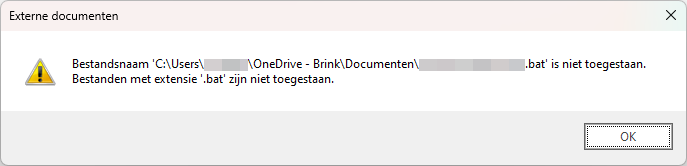
In verband met veiligheidseisen op onze Ibiscloud (AVD) omgeving zijn een aantal bestandstypen dat kan worden toegevoegd als Ibis voor Infra wordt opgestart vanuit dat platform uitgesloten. Deze bestandstypen zijn:
Bestandstype |
Beschrijving |
.ade |
Access Project Extension (Microsoft) |
.adp |
Access Project (Microsoft) |
app' |
Executable Application |
.asp |
Active Server Page |
.bas |
Active Server Page |
.bat |
Batch Processing |
.cer |
Internet Security Certificate File |
.chm |
Compiled HTML Help |
.cmd |
DOS CP/M Command File, Command File for Windows NT |
.com |
Command |
.cpl |
Windows Control Panel Extension (Microsoft) |
.crt |
Certificate File |
.csh |
Csh Script |
.der |
DER Encoded X509 Certificate File |
.exe |
Executable File |
.fxp |
FoxPro Compiled Source (Microsoft) |
.gadget |
Windows Vista gadget |
.hlp |
Windows Help File |
.hta |
Hypertext Application |
.inf |
Hypertext Application |
.ins |
IIS Internet Communications Settings (Microsoft) |
.isp |
IIS Internet Service Provider Settings (Microsoft) |
.its |
Internet Document Set, Internet Translation |
.js |
JavaScript Source Code |
.jse |
JScript Encoded Script File |
.ksh |
UNIX Shell Script |
.lnk |
Windows Shortcut File |
.mad |
Access Module Shortcut (Microsoft) |
.maf |
Access(Microsoft) |
.mag |
Access Diagram Shortcut (Microsoft) |
.mam |
Access Macro Shortcut (Microsoft) |
.maq |
Access Query Shortcut (Microsoft) |
.mar |
Access Report Shortcut (Microsoft) |
.mas |
Access Stored Procedures (Microsoft) |
.mat |
Access Table Shortcut (Microsoft) |
.mau |
Media Attachment Unit |
.mav |
Access View Shortcut (Microsoft) |
.maw |
Access Data Access Page (Microsoft) |
.mda |
Access Add-in (Microsoft), MDA Access 2 Workgroup (Microsoft) |
.mdb |
Access Application (Microsoft), MDB Access Database (Microsoft) |
.mde |
Access MDE Database File (Microsoft) |
.mdt |
Access Add-in Data (Microsoft) |
.mdw |
Access Workgroup Information (Microsoft) |
.mdz |
Access Wizard Template (Microsoft) |
.msc |
Microsoft Management Console Snap-in Control File (Microsoft) |
.msh |
Microsoft Shell |
.msh1 |
Microsoft Shell |
.msh2 |
Microsoft Shell |
.mshxml |
Microsoft Shell |
.msh1xml |
Microsoft Shell |
.msh2xml |
Microsoft Shell |
.msi |
Windows Installer File (Microsoft) |
.msp |
Windows Installer Update |
.mst |
Windows SDK Setup Transform Script |
.ops |
Office Profile Settings File |
.pcd |
Visual Test (Microsoft) |
.pif |
Windows Program Information File (Microsoft) |
.plg |
Developer Studio Build Log |
.prf |
Windows System File |
.prg |
Program File |
.pst |
Microsoft Exchange Address Book File, Outlook Personal Folder File (Microsoft) |
.reg |
Registration Information/Key For W95/98, Registry Data File |
.scf |
Windows Explorer Command |
.scr |
Windows Screen Saver |
.sct |
Windows Script Component, Foxpro Screen (Microsoft) |
.shb |
Windows Shortcut into a Document |
.shs |
Shell Scrap Object File |
.ps1 |
Windows PowerShell |
.ps1xml |
Windows PowerShell |
.ps2 |
Windows PowerShell |
.ps2xml |
Windows PowerShell |
.psc1 |
Windows PowerShell |
.psc2 |
Windows PowerShell |
.tmp |
Temporary File/Folder |
.url |
Internet Location |
.vb |
VBScript File Or Any VisualBasic Source |
.vbe |
VBScript Script File, Visual Basic for Applications Script |
.vbs |
VBScript Script File, Visual Basic for Applications Script |
.vsmacros |
Visual Studio .NET Binary-based Macro Project (Microsoft) |
.vsw |
Visio Workspace File (Microsoft) |
.ws |
Windows Script File |
.wsc |
Windows Script Component |
.wsf |
Windows Script File |
.wsh |
Windows Script Host Settings File |
.xnk |
Exchange Public Folder Shortcut |
Als een bestand met een dergelijke extensie getracht wordt toe te voegen wordt daarvan onderstaande melding gegeven: